Tag: Ai in operations

  • AI Gave You a Great Plan. You Forgot to Tell It Why the Plan Won’t Work.

    AI Gave You a Great Plan. You Forgot to Tell It Why the Plan Won’t Work.

    You bring the plan to the floor. Someone glances at it for ten seconds and says the thing that kills it.

    “Can’t do that Tuesday, we’ve got two people out for cross-training.” Or, “That line’s on lockout till Thursday, maintenance told us last week.”

    You knew that. Everyone on the floor knew that. You just never thought to say it out loud, because it wasn’t a secret. It was just Tuesday.

    AI Doesn’t Know What “Just Tuesday” Means

    The constraint that broke your plan wasn’t hidden from you. It was so obvious to everyone on your team that nobody thought it needed saying.

    That’s the whole problem. AI only knows what’s in the room with it. If a constraint lives entirely in your head, or in a conversation from last week’s shift huddle, AI has no way to know it exists, let alone factor it in.

    Why the Obvious Thing Never Gets Said

    Researchers call this the curse of knowledge. Once you know something, it’s hard to imagine someone else not knowing it. Your team knows Tuesday’s staffing pattern. The tool doesn’t. It can’t read a huddle from last week. The original research

    You didn’t forget to mention the cross-training gap because you were careless. You forgot because it’s been true so long it stopped registering as information worth passing along. It just became part of how Tuesday works.

    The fix starts with a strange question: what does your team know so well that nobody says it anymore? Ask it before you hand the plan to AI. The answer might be a qualification gap, a maintenance window, or the forklift that needs three tries to start. Nobody put that in the staffing spreadsheet.

    This Has a Name Too, and a Real Cost

    Some of this is tribal knowledge: the useful detail that travels between experienced people but never reaches the plan, SOP, or system. That does not make every workaround a good idea. It means a clean schedule can miss the way the job gets done.

    It includes:

    •      The shortcuts and workarounds nobody wrote down.

    •      The sensory calls, “that sounds off,” that only come from years on the line.

    •      The context behind why a rule exists, not just the rule itself.

    When the one person who knows the fixture, the handoff, or the unwritten delay is out, the plan loses that context. AI can surface questions about it. A person still has to check the answers on the floor.

    The Four Constraints That Go Missing Most Often

    Start with four places where an innocent-looking assumption can wreck the shift. Your operation may have others.

    •      Cross-training deficits: only one or two people can run a given station, no matter what the org chart implies.

    •      Maintenance lockouts: equipment that’s technically on the floor but not available.

    •      Tooling changeover delays: the real time a swap takes, not the number on a spec sheet.

    •      Dock bottlenecks: a receiving or shipping dock that can only move so much regardless of what the rest of the plan assumes.

    Any one of these can quietly sink an otherwise solid plan. None of them show up unless somebody says them out loud.

    The Prompt: Force It to Ask What You Forgot

    Open Claude, ChatGPT, or a similar tool. Gather the draft plan, your shift roster, current equipment status, and the constraints you already know. Leave sensitive company details out of a public tool unless your employer has approved their use. Then adapt this prompt to your situation.

    1. Set the Role

    •      Ask it to act as a skeptical operations reviewer. Its first job is to challenge feasibility, not polish the wording.

    •      Tell it to flag what it cannot verify from the information supplied.

    2. Hand It the Data

    •      Paste the full plan and its stated assumptions. Include the shift, line, target, timing, and any dependencies you already listed.

    •      Add the current roster, equipment availability, and material or dock limits you are allowed to share.

    3. Set the Constraints

    •      Ask: “What missing constraint could make this plan impossible or much harder to run as written?”

    •      Have it check at least three relevant categories, such as qualifications, lockouts, tooling, materials, and dock capacity.

    •      Tell it not to assume full staffing, working equipment, or open capacity without evidence.

    4. Define the Output

    •      Return the plan with its assumptions stated plainly.

    •      List the categories that need a floor check. Mark unknowns as unknown.

    •      Write one direct question per category that the right person can answer on shift.

    Take the questions to the people who know the work. Feed the answers back to the tool. Ask it to show exactly what changed in the plan. If a safety or quality rule is involved, follow your approval process before changing the work.

    What Comes Back on a Real Plan

    Ask it to build a plan moving two people from Line 1 to Line 3 for a rush order.

    The plan

    •      Reassign two operators from Line 1 to Line 3 for the shift, covering the rush order’s staffing gap.

    Constraint check

    •      Cross-training: are both operators qualified to run Line 3’s equipment, or only one of them?

    •      Maintenance: is Line 3 fully operational right now, or is any part of it under a lockout?

    •      Dock: can receiving keep pace with Line 3’s faster cycle time, or does this just move the bottleneck downstream?

    Three questions, all answerable on the floor in under a minute, all invisible to a tool that only ever saw the plan and not the reasons it might not work.

    A Second Example: The Changeover That Wasn’t in the Spec

    Ask it to schedule three product changeovers into one shift instead of the usual two.

    The plan

    •      Sequence three changeovers across the shift, spaced evenly to keep the line moving.

    Constraint check

    •      Tooling: does the spec sheet’s changeover time match what this specific line has really run recently, or is it the manual’s optimistic number?

    •      Cross-training: is the operator running the third changeover the same one who’s been doing all the fast ones, or someone still learning the sequence?

    •      Dock: will three changeovers in one shift trigger three separate material pulls, and can the dock keep pace with that?

    Same shape as the first example, completely different plan. The pattern holds because the pattern was never about the plan. It was about which ordinary fact never made it into the room.

    The Floor Check Comes Before the New Plan

    Suppose the tool asks whether both operators can run Line 3. The roster says yes. You ask the lead and learn one operator last ran it six months ago. That is a staffing decision, not a prompt-writing problem.

    Now check the schedule against the people and equipment that will carry it out. A fast pass takes three conversations: the lead who owns the assignment, maintenance if availability is uncertain, and the team that receives the extra output. You do not need a committee meeting. You need the three answers the plan depends on.

    If one answer is no, put it back into the plan as a hard constraint. “Only one operator can run Line 3 without a refresher” is useful. “Staffing may be an issue” gives the model room to invent its way around the problem.

    Ask for two options: a plan that works with today’s crew, and a plan that works only if training or maintenance clears the constraint. Label the condition beside the second option. That keeps a conditional plan from sneaking onto the floor as if someone had already approved it.

    Before you use either option, check the handoff. Who will tell the next shift what changed? Where will you record the constraint so you do not rediscover it tomorrow? The aim is not to make AI sound cautious. It is to stop wasting a shift on a plan that only worked in a chat window.

    Why This Beats Just Explaining Everything Upfront

    Trying to list every possible constraint before asking for a plan is exhausting. You’ll still forget something, because the curse of knowledge doesn’t turn off just because you’re trying harder.

    Ask AI which categories need checking. Then ask the people who work the line for the facts. The tool can name a likely blind spot. It cannot tell you that Maria is the only person certified for a Tuesday changeover unless you give it that information.

    Build a Running List Instead of Starting Over Each Time

    A constraint check makes the missing information easier to spot. It does not certify the plan. If the answers change tomorrow, the check has to change too.

    Keep a short, living list of your floor’s standing constraints, who’s really cross-trained on what, which equipment has a recurring maintenance pattern, where the dock tends to bottleneck during a rush. Update it when something changes, not on a schedule nobody keeps.

    Hand that list to AI alongside the plan next time. Some of the next check becomes confirmation instead of starting from zero. Keep the list short enough to update. An old staffing roster makes a lovely document and a terrible plan.

    Where This Connects

    If the tool keeps guessing at your baseline, start with Your AI Doesn’t Know Your Operation. Stop Letting It Guess. It shows how to keep the standing facts in a short shift binder instead of retyping them every time.

    For the related problem of a documented process that no longer matches the floor, read AI Read Your SOP. Too Bad Your Floor Doesn’t Follow It. A plan cannot use the right constraints when the process description itself is wrong.

    Before Any Plan Leaves the Room

    Run the constraint check before the plan goes anywhere near the floor, not after someone points out the obvious thing you forgot.

    Want more prompts built for a real shift? Subscribe to The Daily Constraint and get the free “24 AI Prompts That Survive Contact with Your Floor” Field Guide. The next time AI hands you a polished plan, run the floor check before anyone changes an assignment.

    What “everybody knows” fact has killed a plan on your floor? Tell me the one that should have been in the first draft.

  • AI Read Your SOP.  Too Bad Your Floor Doesn’t Follow It

    AI Read Your SOP. Too Bad Your Floor Doesn’t Follow It

    The SOP says the fastener check happens every hour, logged on the sheet by the press. Nobody’s done it that way in eight months.

    Everyone eyeballs the bin and tops it off when it’s getting low, because the hourly check was written for a run rate the line hasn’t hit since a machine upgrade nobody bothered updating the paperwork for.

    Feed an AI tool the SOP. It optimizes a floor that stopped existing eight months ago.

    Feed it the real floor notes instead. It might just as happily optimize the workaround, no questions asked, because nothing tells it that workaround was never approved by anyone with the authority to approve it.

    Neither one is the truth by itself. That’s the whole problem.

    Your SOP and Your Floor Have Quietly Become Two Different Processes

    Safety researchers call this split work-as-imagined versus work-as-done, which is an academic way of saying the person who wrote the SOP has never run your line at ten minutes to end of shift.

    Work-as-imagined is the flowchart. Work-as-done is whatever gets the job finished without anyone getting hurt or written up, built out of a hundred small decisions nobody wrote down because nobody thought to.

    The distinction comes from resilience engineering, a field built largely on the work of Erik Hollnagel, who apparently needed a research career to confirm what every operator already knew for free.

    Small gap, your SOPs are still roughly honest. Wide gap, and you’re running two different rulebooks on the same floor and hoping nobody asks which one’s real.

    Why Feeding AI Just One Side Makes It Worse

    Hand an AI tool only the SOP. It believes every word the way a brand-new hire believes the laminated sheet on the wall, right up until someone pulls them aside and says quietly, “yeah, we don’t do it that way.”

    Any recommendation it builds sits on a step that isn’t happening. Broken before it even leaves the chat window.

    Hand it only the raw floor notes instead. It’s gullible in the exact opposite direction. It has no idea the workaround was never blessed by anyone with the actual authority to bless it.

    It optimizes the shortcut with the same straight face it would use on an approved procedure, because nothing in a casual description flags it as unofficial. Both mistakes look identical from the outside: a clean, confident answer that sounds like it knows what it’s talking about.

    Only one of them is standing on real ground. The output alone will never tell you which.

    The Prompt: Make It Compare Both Versions

    1. Set the Role

    ●        Tell it to act as a process auditor whose only job is finding the gap between documented procedure and actual practice, not choosing a side or picking whichever version sounds more efficient.

    2. Hand It the Data

    ●        The written SOP, in full. The actual floor description of how the task really gets done, in the operator’s own words if you have it.

    3. Set the Constraints

    ●        It must not treat either version as automatically correct. Every difference between the two gets flagged as a difference, not silently resolved in favor of one side.

    4. Define the Output

    ●        A side-by-side list of every point where the SOP and the real practice diverge.

    ●        For each divergence, one line on the likely reason the gap exists: outdated documentation, a genuine safety workaround, or a shortcut that’s probably just faster.

    ●        A separate flag for any divergence that touches safety, quality, or anything regulated. Those don’t get resolved by a chat window.

    What Comes Back on the Fastener Example

    SOP version

    ●        Hourly fastener count, logged by hand at the press.

    Floor version

    ●        Visual check, topped off when the bin looks low, no log kept.

    Likely reason for the gap

    ●        Run rate changed after a machine upgrade. The hourly interval was calibrated to a slower line that no longer exists anywhere but on paper.

    Flag

    ●        Not safety-critical by itself, but the missing log means nobody has an actual record of fastener supply right now. That’s worth a real decision, not whichever habit happens to already be in motion.

    That last line is the entire point. Not “the SOP wins” or “the floor wins.” A clear picture of exactly where the two drifted apart, so a real person makes the call instead of an AI tool quietly crowning a winner nobody asked it to pick.

    A Second Example, Where Guessing Wrong Costs Something Real

    Not every gap is as low-stakes as a fastener count. Say the SOP requires two people on anything over 40 pounds.

    Nobody’s standing around waiting on a second person when the line’s backed up and the part just needs to move. So the floor version, built up over months by people who know their own backs, quietly became one person up to about 60.

    SOP version

    ●        Two-person lift required above 40 pounds, no exceptions noted.

    Floor version

    ●        Single operator handles up to roughly 60 pounds solo, based on the team’s own read of what’s manageable.

    Likely reason for the gap

    ●        Speed. Waiting on a second set of hands costs real time on a busy shift. Busy shifts don’t reward waiting.

    Flag

    ●        This one doesn’t get settled by comparing two documents. It’s a real safety call that needs someone with actual authority to either enforce the original limit or formally change it. An AI tool has no business quietly picking either answer for you.

    That’s the version of this gap that matters most: the one where guessing wrong isn’t a productivity hiccup, it’s someone’s back. No comparison prompt gets to make that call alone. Neither should you, without the right person in the room.

    Not Every Gap Deserves the Same Attention

    Run this comparison on a real floor and you’ll surface a dozen small divergences in one pass, most of them harmless. Try to resolve all of them the same afternoon and you’ve just invented a project nobody finishes.

    Sort what comes back into three piles. Safety and anything regulated go first, always, no negotiating.

    Quality and customer commitments go second. Genuine efficiency shortcuts with no real downside can sit for now. Honestly, some of them deserve to get written into the SOP instead of stamped out just because nobody asked first.

    The goal was never zero gaps. A floor with zero gap between what’s written and what’s real either has an unusually disciplined team, or more likely, nobody’s looked in a long while.

    Where This Connects

    Feeding AI a clean document instead of messy reality is the same trap covered in Your AI Was Trained on the Happy Path. Your Floor Never Follows It., a tool optimizing the version of the process that exists on paper instead of the one that exists on the floor.

    It’s also worth reading alongside You Can’t Automate a Process You’ve Never Actually Mapped, since the same gap that trips up an AI recommendation is exactly what trips up an automation project that skipped the mapping step to save a week.

    Before You Trust Either Version

    An SOP nobody checks against the real floor eventually turns into fiction with a company letterhead on it. Floor practice nobody checks against the SOP eventually turns into an unofficial standard that nobody with actual authority ever signed off on.

    Run this comparison once a quarter, the same way a shift binder goes stale if nobody opens it. The gap will always exist. The only real question is whether it’s still the gap you think it is, or whether it quietly became something else while nobody was looking.

    Comment below with the last time your real floor practice and your official SOP had nothing to do with each other.

  • When You’re Right but Can’t Send the Email You Want to Send

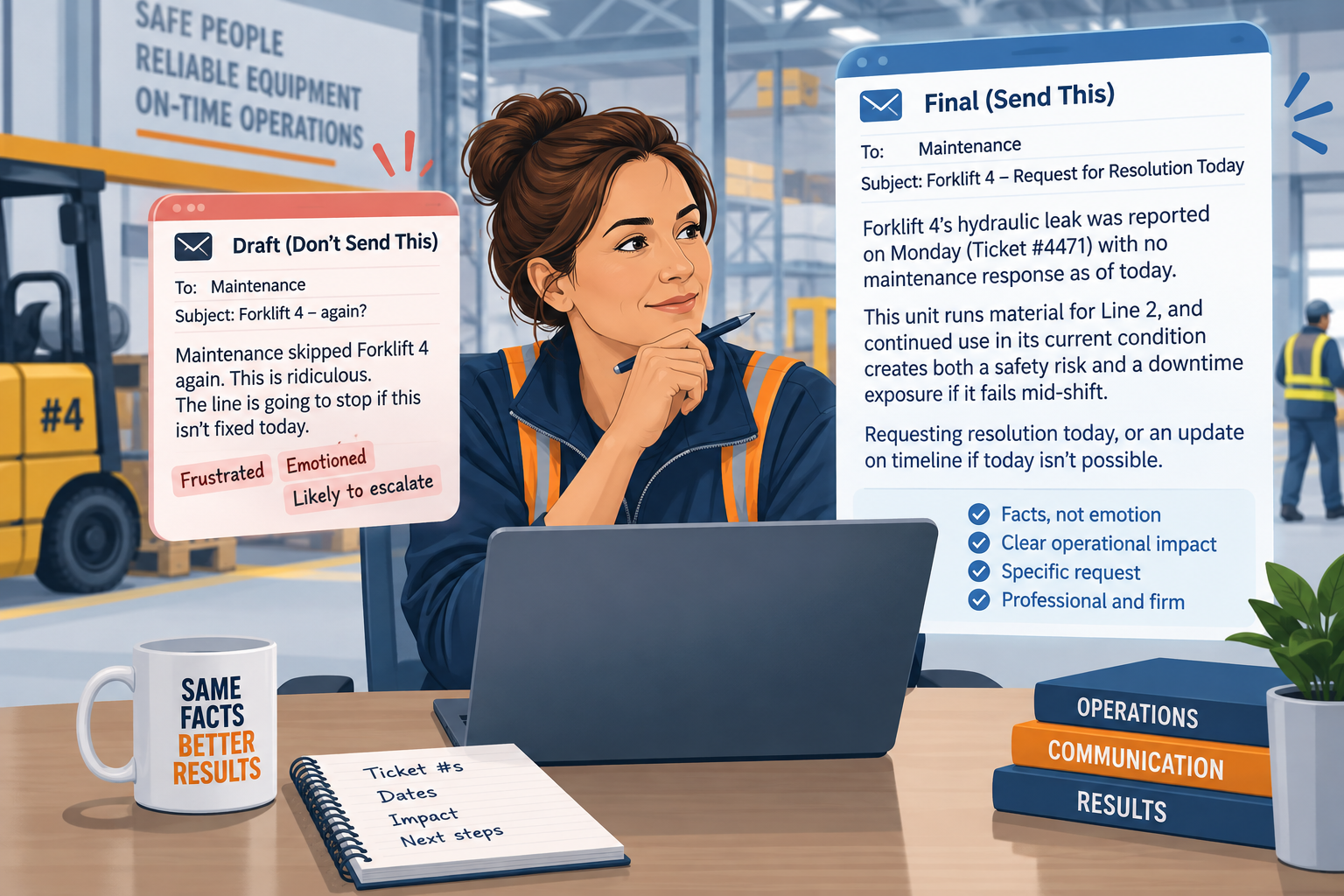
    When You’re Right but Can’t Send the Email You Want to Send

    Maintenance ghosted Forklift 4’s hydraulic leak for four days. You’re tired, you’re frustrated, and you need it fixed today, not next week.

    The email you want to send would probably get you a meeting with HR. The email that gets the forklift fixed looks completely different. Most people never learn to write the second one under pressure.

    Here’s how to turn the first draft into the second one without losing the part that makes it effective: the fact that you’re right.

    Card 1: The Raw Frustration Draft

    This is the version that exists in your head before anything gets typed.

    “Maintenance skipped Forklift 4 again. This is ridiculous. The line is going to stop if this isn’t fixed today.”

    Write this version first if it helps. Getting it out of your system matters.

    Just don’t send it. Don’t skip straight past it either, because the frustration in it is where the real information is buried.

    Card 2: The Calibrated AI Prompt

    Feed the raw version to Claude or ChatGPT with instructions like this:

    “Rewrite this with a firm, objective operational tone. Cite the safety risk, the downtime exposure, and the ticket history. Remove the emotion but keep the urgency. Don’t soften it into something that sounds optional.”

    That last line matters. Most rewrite requests accidentally sand a message down until it reads as a gentle suggestion instead of a real problem. This instruction stops that from happening.

    Card 3: The Final Communication

    What comes back reads like this:

    “Forklift 4’s hydraulic leak was reported on Monday (Ticket #4471) with no maintenance response as of today. This unit runs material for Line 2, and continued use in its current condition creates both a safety risk and a downtime exposure if it fails mid-shift. Requesting resolution today, or an update on timeline if today isn’t possible.”

    Same facts. Same urgency. Zero language anyone could screenshot and use against you later.

    Why This Isn’t Just “Being Nicer”

    There’s a real distinction in workplace communication research between assertive and aggressive tone. It’s worth understanding rather than just imitating.

    One breakdown of the difference lays it out cleanly: aggressive communication disregards the other person’s position entirely, while assertive communication states the facts and the need plainly, without either attacking or softening into a suggestion.

    The rewritten forklift email is the assertive version, not a watered-down one. It says exactly what’s wrong and exactly what needs to happen. It just doesn’t hand anyone a reason to focus on your tone instead of the actual problem.

    The Accountability Rule

    Every version of this email works better with two things attached: a timestamp and a ticket number.

    “Maintenance is slow” is an opinion. Opinions are easy to dismiss.

    “Reported Monday, Ticket #4471, no response as of Thursday” is a fact. Facts are a lot harder to wave off in a follow-up meeting.

    Keep a running note of when you reported something and what reference number it got. That habit turns every future email like this into a thirty-second rewrite instead of a fresh fight.

    Why the Rewrite Works Better Than the Original

    The raw version feels satisfying to send. It rarely gets the forklift fixed any faster.

    It tends to make the next request from you a little easier to dismiss too. A heated email is easy to file under “someone’s having a bad day” instead of “real problem, needs action.”

    The calibrated version does something the raw one can’t. It puts the reader in a position where ignoring it looks bad on paper, not just uncomfortable in a conversation.

    That’s the actual goal. Not sounding nicer. Getting the fix.

    A Second Version, Different Department

    Maintenance isn’t the only source of this kind of friction. The night shift leaves a line running out of spec and doesn’t flag it, and the day shift inherits the problem three hours in.

    Raw draft: “Night shift didn’t say anything about Line 3 running hot again. Found out the hard way an hour into my shift.”

    Calibrated: “Line 3 was running above the acceptable temperature range at the start of day shift, with no note in the handoff log. This created a quality risk on the first hour of production before it was caught. Requesting that temperature checks get added to the standard handoff checklist going forward.”

    Same shape, different department. Facts, risk, a specific ask, nothing anyone can dismiss as tone.

    What Not to Let the Rewrite Do

    A calibrated tone isn’t the same as a vague one. If the rewrite starts using phrases like “when convenient” or “at your earliest opportunity,” that’s the tool softening urgency it was told to keep.

    Push back on the draft the same way you’d push back on a person. “Make it more direct” or “add the deadline back in” gets a second pass that fixes it fast.

    A Prompt You Can Reuse on Any Cross-Shift Friction

    The same shape works whether it’s maintenance, another shift, or a different department entirely:

    “Rewrite this with a firm, objective tone. Cite the specific risk or cost of not acting, reference any ticket or timestamp I’ve provided, and keep the urgency without the emotion.”

    Swap in your own raw draft and your own specifics. The structure holds regardless of which department is on the other end.

    When to Stop Emailing and Start Walking Over

    Worth saying plainly: a well-written email is not a substitute for an actual conversation once something’s been ignored twice.

    If Ticket #4471 gets a second silence, the next move is a phone call or a walk to the maintenance shop. Not a third, even better-worded email.

    The template above earns you a fair first shot at resolution through the normal channel. It’s not meant to replace the moment when you decide the normal channel isn’t working anymore.

    The Floor Manager’s $20 AI Stack covers which tool handles this kind of writing best if you’re still deciding. Shift Notes to Shift Handoff: We Tested 3 AIs on the Same Messy Floor Notes picks up the same theme from a different angle, turning a full shift’s worth of chaos into something the next person can use.

    Comment below with the email you really wanted to send this week, and the one you sent instead.

  • Your AI Doesn’t Know Your Operation. Stop Letting It Guess.

    Your AI Doesn’t Know Your Operation. Stop Letting It Guess.

    Every session starts the same way. “I run an evening packaging shift with four lines.” Again.

    Chatbots forget everything the moment a conversation ends. Type your plant layout into a fresh chat one more time and something in you starts looking for a reason to stop using the tool at all.

    There’s a fix. It’s not a better memory feature. It’s a document you write once.

    Memory vs. Something That Stays Put

    A platform’s built-in memory is genuinely useful for tone and general preferences. It’s the wrong place to store anything that has to be exact.

    Memory is a rough impression the tool forms over time. It can drift, misremember a detail, or apply something from a different context by mistake.

    Project Knowledge, or Custom Instructions depending on the platform, works differently. It’s a fixed document you control directly. It says the same thing every time, because you wrote it and nothing’s quietly reshaping it in the background.

    For anything with a real number attached, a safety stock threshold, a maximum changeover time, that difference matters. Memory is a coworker’s recollection. A written document is the actual policy.

    Where This Lives

    In Claude, this goes in a Project’s knowledge base, a file the AI reads before every message in that Project without you retyping any of it. Anthropic’s own help center confirms this is available even on the free plan, up to five Projects, not locked behind a paid tier the way some people assume.

    In ChatGPT, the same idea lives in Custom Instructions or inside a Project’s own instructions field. OpenAI’s own documentation confirms Custom Instructions work across every plan too, web, desktop, and mobile.

    Either way, the mechanism is the same. Write it once, attach it to where you do this specific kind of work. Every future conversation in that space starts already knowing your plant instead of starting from nothing.

    The Shift Binder: What Goes In It

    Three sections, kept short enough that you’ll maintain them.

    Plant Baseline

    ●        Lines you run, and what each one produces.

    ●        Typical throughput per line, per shift.

    ●        Shift hours and crew size.

    Critical Thresholds

    ●        Safety stock limits for anything that runs out and stops a line.

    ●        Maximum acceptable changeover time before it counts as a problem, not routine.

    ●        Any number where crossing the line means something needs immediate attention, not a mention in the next meeting.

    Tone Rules

    ●        Zero fluff. Skip the preamble, lead with the answer.

    ●        Lead with safety and downtime risk before anything else, every time.

    ●        Prioritize by dollar or output impact when more than one thing needs attention at once.

    That’s the whole binder. Long enough to be useful, short enough that updating it doesn’t feel like a chore.

    What a Filled-In Version Looks Like

    Abstract headers are easy to nod along to and hard to write for real. Here’s a real one, short enough to copy the shape directly.

    “Plant Baseline: Four packaging lines, Lines 1 through 4. Line 2 runs the highest volume and is the most changeover-sensitive. Evening shift, 3pm to 11pm, crew of six.

    Critical Thresholds: 6mm fastener backup bin below 150 units counts as low stock. Any changeover over 20 minutes needs a reason code logged. A quality hold on more than 5 units gets flagged immediately, not batched into end-of-shift notes.

    Tone Rules: No preamble, lead with the direct answer. Downtime and safety issues come first in any summary, regardless of what else happened that shift.”

    Three short paragraphs, and every future conversation in that Project already knows the plant.

    A Real Difference This Makes

    Without the binder, “Can you help me figure out if this changeover took too long?” gets a generic answer about changeover best practices. The tool has no idea what your baseline even is.

    With the binder loaded, the same question gets checked against your actual maximum acceptable time, the one you wrote down, not an industry average pulled from nowhere in particular.

    That’s the entire value. Not a smarter answer. The same question, answered against your real numbers instead of a stranger’s guess at what’s normal.

    Where People Get This Wrong the First Time

    The most common mistake is writing the binder like a mission statement instead of a reference document. Nobody needs “we are committed to operational excellence” in there. The tool needs numbers and rules, not values.

    The second mistake is cramming everything into one giant Project. A binder for your evening shift and a binder for a completely different piece of work start fighting each other for relevance. The AI starts blending context that was never supposed to mix. Keep it scoped to one real area of responsibility.

    The third is writing it once and treating it as finished. A binder is closer to a living document than a one-time setup task, even though it feels done the day you write it.

    Keeping It Current

    A binder that’s six months stale is worse than no binder. It’ll confidently apply an old threshold nobody’s used since spring. It’ll sound just as certain doing it wrong as it would doing it right.

    Set a recurring reminder, once a quarter, to open it and check whether anything’s changed. A new line added, a threshold that got revised, a shift pattern that shifted. Five minutes keeps it worth trusting.

    The alternative is finding out the hard way, mid-conversation, that the tool’s still working off a threshold from two supervisors ago.

    Get the Template

    Rather than build this from scratch, The Daily Constraint newsletter has the raw text file ready to import, structured exactly the way it’s laid out above. Subscribe. It lands in your inbox, ready to paste into whichever tool you’re using.

    The Floor Manager’s $20 AI Stack is worth reading first if you haven’t settled on a tool yet. The 5-Whys Incident Framework pairs well with this binder too, since a tool that already knows your plant runs that framework better than one starting cold.

    Comment below with the one detail about your floor you’re tired of retyping every single day.

  • The 5-Whys Incident Framework: Drilling Down on Line Stoppages in 60 Seconds

    The 5-Whys Incident Framework: Drilling Down on Line Stoppages in 60 Seconds

    Line 2 goes down forty minutes during a die swap. The lazy conclusion is sitting right there, waiting: Marcus was slow.

    Real continuous improvement doesn’t stop at the first name it finds. It keeps asking why until the actual system shows up, not just the person standing closest to it when things went sideways.

    Here’s a prompt that forces that discipline instead of hoping you remember to apply it yourself at the end of a long shift.

    Where This Framework Comes From

    The technique itself isn’t new or trendy. Sakichi Toyoda developed it at Toyota in the 1930s. It’s been the backbone of root cause work in manufacturing ever since.

    ASQ’s own breakdown covers the formal version, the one taught in Six Sigma courses everywhere.

    The number five is a habit, not a law. Some real investigations land on the actual root cause by why three.

    Others need seven or eight. Five is just the number that usually gets there, so it’s the number everyone defaults to.

    The Framework Prompt

    Paste this into Claude or ChatGPT before you start, not after you’ve already decided what happened.

    “Act as a Six Sigma facilitator running a 5 Whys analysis with me. After each answer I give, challenge it, ask whether it’s a root cause or just another symptom, and push me to the next why. Don’t accept ‘human error’ or a person’s name as a final answer. Keep going until the answer points to a system, a process, or a missing safeguard. Keep going until the answer points to a system, a process, or a missing safeguard we could actually fix. Don’t stop just because we’ve reached five.”

    That last instruction matters more than it looks. Without it, most 5 Whys sessions quietly stop the moment they reach something uncomfortable to write down.

    Why This Isn’t the Same as Just Asking “Why Did This Happen”

    Typing a plain question into a chat window gets a plain answer, usually the first one, usually the easy one. That’s not the framework’s fault, it’s just how a general question gets treated by a tool with no instruction to push further.

    The system prompt above changes the job entirely. It’s not answering a question anymore. It’s holding a line, refusing to accept the first, second, or even third answer as final, the same way a good facilitator would in an actual room full of people ready to move on.

    That distinction is the entire value of writing this out as a real prompt instead of winging it in the moment.

    The Worked Example: Station 3, Forty Minutes

    Here’s the actual chain, run start to finish.

    Why 1: The die swap took 40 minutes. Standard is 15.

    Something slowed the physical swap down well past what a trained operator should need.

    Why 2: The alignment bolts had seized.

    Not a new problem. A maintenance issue nobody flagged before this shift.

    Why 3: The tooling cart was out of anti-seize lubricant.

    The supply that prevents bolts from seizing in the first place wasn’t where it needed to be.

    Why 4: The restock run was missed on Tuesday.

    A scheduled resupply didn’t happen. Nobody caught the gap until a machine was already down.

    Why 5: Backup fasteners and consumables have no visual reorder trigger.

    There’s no Kanban system flagging low stock before it becomes a shift-stopping problem. That’s a system-level root cause worth fixing. It’s nowhere near Marcus.

    Five whys, and the story moved from “an operator was slow” to “we have no system telling anyone when the cart’s running low.” One of those gets fixed with a conversation. The other gets fixed with a bin and a card, and stays fixed.

    Why This Almost Never Happens on Its Own

    Left alone, most incident conversations stop at Why 2, maybe Why 3 on a good day. Someone identifies a proximate cause and writes it down. The shift moves on, because there’s always something else demanding attention.

    The AI’s actual job here isn’t cleverness. It’s stubbornness. It keeps asking the next question after a tired room would have stopped.

    It doesn’t have a relationship with anyone in the room that makes the next question awkward to ask. That’s the entire point of using it for this specific job.

    The Floor Takeaway: A Format Leadership Can Use

    Once the five whys are done, ask for a short summary in this shape:

    ●        Incident: what happened, when, how long it lasted.

    ●        Root cause: the system-level answer from Why 5, not the surface-level answer from Why 1.

    ●        Immediate fix: what gets done today.

    ●        Systemic fix: what changes so this specific chain of events can’t repeat.

    ●        Owner: who’s responsible for the systemic fix, by name, with a date.

    That last line is the one incident reports skip constantly. A root cause with no owner is just a well-documented shrug.

    A Pattern Worth Watching For

    Notice how often Why 5 lands on the same handful of places: a missing reorder trigger, a skipped restock, a check nobody owns. It’s rarely a person. It’s almost always a system quietly missing a safeguard that would have caught this before it became a story.

    That’s not a coincidence. That’s what root cause usually looks like once someone gets there instead of stopping early. It’s the same pattern whether the incident is a die swap, a quality escape, or a safety near-miss.

    This Isn’t Just for Downtime

    The Station 3 example is a line stoppage because that’s the easiest version to walk through start to finish. The same five questions work just as well on a quality escape, three bad units that made it further than they should have, or a near-miss that didn’t hurt anyone this time.

    Swap the first why. Everything after it works exactly the same way. “Three units shipped with the wrong torque spec” leads down its own chain, and it usually ends up in the same neighborhood: a missing check, not a careless person.

    Why the AI Doesn’t Get Tired of Asking

    A person running this analysis at hour ten of a shift has every reason to stop early. The AI doesn’t have a shift.

    It doesn’t get impatient. It doesn’t have a relationship with anyone in the room that makes the fourth why feel awkward to ask out loud.

    That’s not a replacement for judgment. Someone still has to know the floor well enough to recognize when an answer is real versus when it’s a polite deflection. The tool just refuses to let the conversation stop before it’s earned the right to.

    Shift Notes to Shift Handoff: We Tested 3 AIs on the Same Messy Floor Notes covers the other end of this same shift, turning what happened into a clean handoff once the incident itself is sorted. The Floor Manager’s $20 AI Stack is worth a look too, if you’re still deciding which tool to run this framework in.

    Comment below with the last incident report that got blamed on a person when it was really a system. Bet it’s an easy one to name.

  • Dirty Shift Data: Feeding Floor Spreadsheets to AI Without Leaking Company Data

    Dirty Shift Data: Feeding Floor Spreadsheets to AI Without Leaking Company Data

    Plant spreadsheets are never clean. Three date formats in one column, half the reason codes missing, operator names sitting right there in plain text.

    That’s fine for a file only your team ever opens. It’s a different situation the moment you’re pasting it into a chat window run by a company that isn’t yours.

    Here’s the thirty-second scrub to run first, what happens to a file once you upload it, which tool handles the analysis well, and a prompt you can reuse on the next downtime log that lands on your desk.

    The 30-Second Data Scrub

    Do this before anything gets uploaded, not after.

    ●        Replace real names with role labels. “Marcus” becomes “Operator A.” Ten seconds with find-and-replace, and the pattern in the data doesn’t care what anyone’s called.

    ●        Replace internal part numbers with generic labels. “SKU-4471-B” becomes “Component 1.” Pattern analysis still works, minus anything a competitor could use if it ever left the building.

    ●        Strip anything that identifies your specific plant or client by name, addresses, contract numbers, PO references.

    ●        Keep the real numbers untouched. Dates, quantities, downtime minutes. None of that needs scrubbing. Scrubbing it would break the analysis you’re asking for.

    That’s the whole checklist. Longer than that, and nobody does it before their coffee gets cold.

    A Quick Before and After

    Raw row: “Line 2 down 40 min, changeover, Marcus, station 3, forklift 4 hydraulic leak.”

    Scrubbed row: “Line 2 down 40 min, changeover, Operator A, station 3, Forklift 4 hydraulic leak.”

    Same pattern, same usable data. One version identifies a real person by name in a file leaving the building, the other doesn’t.

    What Happens to the Data Once You Upload It

    Worth knowing the current policy here, because it changes and old advice gets stale fast.

    Business accounts generally provide stronger data protections than personal accounts. OpenAI says ChatGPT Business and Enterprise data isn’t used to train its models by default. Anthropic says the same for Claude for Work Team and Enterprise accounts.

    Personal accounts need a closer look. ChatGPT Free, Plus, and Pro users can turn off “Improve the model for everyone” under Data Controls. Claude Free, Pro, and Max users can control whether their chats are used to improve Claude through their privacy settings.

    Retention isn’t the same thing as model training either. How long a provider keeps data can depend on the product, settings, and circumstances.

    If you’re using a personal account for anything work-related, check your settings before uploading it. Don’t trust a blog post from last year either, including this one six months from now. These policies move.

    What Not to Upload, Full Stop

    The scrub above handles names and part numbers. Some things don’t belong in any AI tool at all, personal account or business account, scrubbed or not.

    ●        Anything tied to a workplace injury or safety incident under investigation. That’s a legal and HR matter, not a data analysis task.

    ●        Customer contact information, addresses, phone numbers, anything that identifies a person outside your company.

    ●        Login credentials, access codes, anything that could get someone into a system they shouldn’t be in.

    When in doubt, ask whether you’d be comfortable if this exact file showed up in a deposition someday. If the answer’s no, it doesn’t go in a chat window, scrubbed or not.

    Everyone’s done the other version of this too: pasted first, noticed what was sitting in the next cell over a half-second too late. Worth a second look before you hit enter, not after.

    Tool Breakdown: ChatGPT vs. Claude on Raw Data

    Both can work with uploaded files, but don’t assume they’ll approach the same messy spreadsheet the same way.

    ChatGPT is a particularly good fit when the question depends on explicit calculation. It can run Python against uploaded spreadsheet data, which makes questions like total downtime by cause code, averages, filtering, and statistical analysis straightforward.

    Claude can also work with uploaded files and is useful when you’re trying to interrogate a messy operational record conversationally. Whichever tool you use, give it a specific question and verify important calculations against the source data.

    Pick based on the actual job you’re doing, not the logo on the chat window.

    Where Gemini Fits Into This

    If your downtime logs already live in Google Sheets, Gemini has one obvious advantage: you can work with AI inside the spreadsheet instead of moving the file into a separate chat. Eligible Google Workspace plans include Gemini features directly in Sheets.

    Sheets also has AI functions that can summarize, categorize, and analyze information from specified ranges. That’s useful when the spreadsheet is already part of your normal workflow.

    The same verification rule still applies. Generated analysis can be wrong, regardless of which company’s name is on the tool. Check important numbers before you act on them.

    The Practical Floor Prompt

    Once your data’s scrubbed, this is the prompt to run:

    “Identify the top 3 downtime contributors by total minutes, and flag any inventory items currently below safety stock.”

    That’s specific enough that neither tool has to guess what you’re after. Feed it a scrubbed CSV of your downtime log or inventory count, expect a direct answer back, not a summary of the whole file restated in different words.

    If the first answer feels too broad, narrow it. “Top 3 downtime contributors on second shift only” gets you something you can act on Monday morning.

    Make the Scrub a Habit, Not a One-Time Fix

    The first time through, the checklist takes real thought. Which columns have names, which have part numbers, what’s safe to leave alone.

    After that, it’s the same four things every time, and it stops taking any thought at all. Most people who stick with this build a simple find-and-replace list once, the actual names on their team mapped to Operator A through Operator F, and reuse it on every file going forward.

    Keep that reference list somewhere separate from the AI tool itself, obviously. The whole point is that the mapping never leaves your machine.

    Where This Saves Real Time

    A downtime log sits in a shared drive for three months. Everyone knows exactly which folder it’s in. Exactly zero people have opened it since it landed there.

    Scrub it, upload it, ask the top-3 question. Fifteen minutes gets you the same answer that used to take someone a weekend with a highlighter and a printed report.

    That’s the whole point here. Not replacing judgment, replacing the part where a real pattern sits buried in a spreadsheet for months because nobody had the time to go looking for it.

    Check the Math Before You Trust It

    Real computation doesn’t mean flawless computation. Before you act on a top-3 answer, spot-check one number against the raw file yourself.

    Pick the single largest downtime contributor it flagged and verify that total by hand, or at least by a second glance at the source rows. If it holds up, trust the rest of the list. If it doesn’t, something in the file confused the tool, a merged cell, a stray header row, and the whole answer needs a second look before it goes anywhere near a leadership meeting.

    The Floor Manager’s $20 AI Stack covers which subscription makes sense for this kind of work if you’re not sure yet. Shift Notes to Shift Handoff: We Tested 3 AIs on the Same Messy Floor Notes picks up right where this leaves off, once the data’s clean and it’s time to write up what it means for the next shift.

    Comment below with the ugliest spreadsheet you’ve ever had to make sense of. Bonus points if it’s still in use.

  • Shift Notes to Shift Handoff: We Tested 3 AIs on the Same Messy Floor Notes

    Shift Notes to Shift Handoff: We Tested 3 AIs on the Same Messy Floor Notes

    A good handoff note has one job. Make sure the real risk gets seen before the small stuff does.

    Most don’t. A downtime event and a broken ice machine end up sitting in the same paragraph, same weight, same font. The next shift lead sorts out which one really matters standing up, usually with someone already asking them a question before they’ve finished reading.

    So we ran an experiment. Same messy notes. Same exact prompt. Three different AI tools. And one uninvited fourth guest we’ll get around to that later.

    The question wasn’t whether they could clean up the grammar. Any of them can do that in their sleep. The real question was whether they’d know what mattered.

    The Note We Fed Every Tool

    This is the raw version, typed the way a tired shift lead really types, half-punctuated and running downhill:

    Line 2 down 40 min around 10am, changeover took longer than usual, think it was the die swap on station 3, Marcus was working it. Forklift 4 still has the hydraulic leak, maintenance said Tuesday but never showed. Ran short on the 6mm fasteners again, used the backup bin, only maybe 200 left in it now. New temp on line 1 afternoon, did fine but slow, needs another day of shadowing before solo. Quality flagged 3 units off the line 2 run after the changeover, pulled and set aside by the press, not scrapped yet, waiting on Denise to look at them tomorrow. Everything else ran normal. Oh and the break room ice machine is out again.

    The prompt isn’t new either. It’s pulled directly from a piece we already published on decoding exactly this kind of inherited note. No reason to make you go dig it up, here it is in full, ready to paste into whatever you’re using tonight:

    You are an operations management assistant helping me process a shift handoff note. I am giving you the raw start-of-shift note from the previous shift lead, written by hand or dictated in a rush. Treat every line as something that might be incomplete.

    Structure your output using the exact sections below:

    1. WHAT HAPPENED

    – A plain-language summary of what actually occurred last shift, in the order it happened if the note makes that clear.

    2. STILL OPEN

    – Anything unresolved that needs my attention or a decision from me today.

    – For each item, note whether it’s urgent (needs action in the first hour) or can wait.

    3. TOP PRIORITY

    – The single most urgent item on this list, and one sentence on why it outranks everything else.

    4. WHO I NEED TO FOLLOW UP WITH

    – Based on what’s in this note, list anyone I likely need to contact today: maintenance, quality, the site leader, HR, a specific operator, anyone named or implied.

    – For each person, say what they need from me and how urgent that follow-up is.

    – Flag anything that looks like it needs to go to Quality or EHS specifically. Those two categories don’t wait.

    5. UNCLEAR OR MISSING

    – Anything in the note that’s ambiguous, contradicts standard work, or is missing information you’d expect to see (headcount, safety incidents, quality holds).

    – Do not guess at anything not stated in the note. Flag it as missing instead.

    Same prompt, same notes, word for word, into ChatGPT, Claude, and Gemini. Free tier on all three, memory cleared first, so nobody walked in with a head start.

    The Verdicts

    ChatGPT

    ●        Top Priority: the forklift’s hydraulic leak, reasoned as outranking the quality hold because the note never confirms whether the leak was tagged out or is still in use.

    ●        Gave the ice machine something none of the other tools bothered with the benefit of the doubt. Filed under “can wait,” but with a real condition attached, unless there’s a sanitation or heat-stress angle nobody mentioned.

    ●        Stayed disciplined on the die swap, calling it “not confirmed” twice instead of letting a guess quietly become a fact.

    ●        Didn’t ask a single clarifying question. Just went straight to work.

    Claude

    ●        Top Priority: also the forklift, same safety-first logic as ChatGPT.

    ●        Did something almost embarrassingly simple that the other two skipped entirely: it filled in every box the prompt asked for, site leader included. Nobody else even mentioned that category existed.

    ●        Caught a genuine distinction nobody else made. Denise’s review is scheduled for tomorrow, but confirming the units’ physical status and paperwork shouldn’t wait that long. Claude split those into two different clocks instead of treating them as one task.

    ●        The only tool willing to say “urgent leaning” out loud instead of forcing the fastener count into a clean yes or no.

    ●        Went further than repair status and questioned whether the leak had ever been formally logged as a safety hazard at all, or just quietly sat as a maintenance ticket nobody escalated.

    Gemini

    ●        Top Priority: the forklift too, and the most procedurally fluent of the three. It reached for real lockout and tag-out language, not a vague “someone should look at this.”

    ●        Most literal about the flagging instruction, tagging entries directly with [FLAG: EHS] and [FLAG: QUALITY] instead of burying urgency in a sentence.

    ●        Also the one that broke the rule. It reasoned that if the die swap caused the delay, current Line 2 production might also be non-conforming, connecting two dots the notes never touched. That’s the exact mistake the source prompt was written to prevent. Gemini’s the one that made it.

    ●        Caught something sharp nobody else did: “set aside by the press” isn’t the same thing as a documented hold. A press ledge is not a quarantine bin, no matter how urgent the tone around it sounds.

    Where They Agreed, Where They Split

    All three landed on the same Top Priority. Three companies, three completely different models, and every one of them decided an unresolved safety risk beats a contained quality hold, even one sitting closer to the loading dock. That’s not a small thing to agree on.

    Where they earned their keep was underneath that headline call. Claude was the only one that followed every instruction in the prompt to the letter. Gemini was the only one that invented a connection nobody asked it to make.

    Read only the top line of each response and you’d think all three did the same job. Read the whole thing. You find out which one you’d really trust with a decision that matters.

    We Also Ran It Through Grok, Out of Curiosity

    Full disclosure: not a tool I reach for often. My husband swears by it. Tells me not giving it a fair shot for months. Challenge accepted.

    Grok broke from the pack entirely. Its Top Priority was the quality hold, reasoned as needing immediate attention to protect product integrity and keep good material from mixing with bad. It also said flatly that nothing in the note pointed to an EHS incident, the opposite read from every other tool in the test.

    Not necessarily wrong. A hold sitting close to shipping is a real argument, not a lazy one. But it’s the one tool in the whole lineup that walked away from consensus on the single call that mattered most, which is worth knowing if it’s the one already living in your phone.

    How to Run This Yourself

    Pull a real handoff from your own floor, one with at least one safety-adjacent item and one genuine non-issue tangled up together.

    Clear memory and any saved custom instructions first, in every tool you’re testing. That’s the step people skip. It’s also the one that quietly rigs the result toward whichever tool already knows your plant.

    Paste the identical prompt above and your own notes into each one, back-to-back, same sitting. Read Top Priority first, before anything else. That single line tells you more about how a tool reasons than the rest of the output combined.

    The Actual Takeaway

    Run this on your own notes before you trust any one tool’s version of “what matters most” without a second opinion standing next to it. Free tier, five minutes, the exact prompt is sitting above, copy it and go.

    If two tools agree and a third doesn’t, that disagreement is the useful part. It’s pointing directly at the judgment call that’s genuinely hard. The kind of call that turns into a real decision nobody remembers making unless someone catches it first.

    The Floor Manager’s $20 AI Stack is worth a read if you haven’t settled on which of these is worth paying for yet. We ran this same test live on camera too, over on The Constraint Files, if you’d rather watch the answers land in real time than read about them after the fact.

    Comment below with which tool you’d trust to run your next real handoff, and which one just lost your trust after reading this.

  • Can AI Help You Get More Production from the Same 10-Hour Shift?

    Can AI Help You Get More Production from the Same 10-Hour Shift?

    You walk into your shift with a plan.

    You know the volume. You know the headcount. You know what yesterday missed and where today’s trouble spots are likely to be.

    For approximately seven minutes, everything looks great.

    Then operations happens.

    Someone calls out. A process starts falling behind. Equipment goes down. Quality starts moving in the wrong direction. Someone needs an answer about yesterday’s miss. Your labor plan needs to change. There’s a meeting in 20 minutes, and you’d really like to know what caused the problem before you’re expected to explain how you’re going to fix it.

    By lunch, you’ve pivoted so many times your hair feels like it’s on fire from the friction.

    Welcome to operations.

    Your Operation Has a Constraint. So Do You.

    You spend your shift thinking about capacity.

    How many people do you have? How many labor hours? How much volume? What’s your expected rate? Where’s the bottleneck? What can you move, change, eliminate, or improve to get more from the resources available?

    But there’s another finite resource affecting your operation every day.

    YOUR time.

    You get the same 10 hours whether everything runs beautifully or the building appears determined to test your commitment to operational leadership as a career choice.

    And some days, those hours disappear remarkably fast.

    A woman warehouse manager reviews shift notes and labor records while handling the demands on her time.
    AI can’t add hours to your shift. Used well, it can help you reclaim more of the hours you already have.

    You still need to:

    • Investigate yesterday’s misses.
    • Understand today’s numbers.
    • Find bottlenecks.
    • Analyze problems.
    • Explain findings.
    • Coach your people.
    • Follow up on corrective actions.
    • Work on process improvements.
    • Learn whatever new metric, system, process or methodology landed in your lap this week.

    Oh, and presumably run the operation.

    Wouldn’t want to forget that part.

    Enter AI. But Keep Your Cape.

    There is plenty of content online right now suggesting AI can do practically everything short of unloading the trailer for you.

    It can’t.

    There are operational problems AI simply cannot solve.

    AI cannot walk your floor.

    It can’t hear the strange noise coming from a machine that supposedly has nothing wrong with it.

    It can’t notice a queue forming where your dashboard says everything is fine.

    It doesn’t know that your highest-performing associate quietly developed a better method three months ago.

    It doesn’t know that everyone ignores Step 7 of the standard work because Step 7 makes absolutely no sense in the real world.

    It doesn’t know your operation.

    YOU do.

    REALITY CHECK

    AI is a tool. It isn’t Gemba. It isn’t judgment. It isn’t leadership. And a beautifully formatted answer based on bad information is still a bad answer.

    So why am I building an entire publication about using AI in operations?

    Because AI doesn’t have to replace your expertise to make YOUR expertise more valuable.

    The Opportunity Is in the Hours Between the Fires

    Think about how much time you spend on the work surrounding the work.

    You collect information.

    You compare numbers.

    You research something you don’t understand.

    You organize observations.

    You prepare for meetings.

    You turn findings into explanations.

    You rewrite the same information for different audiences.

    You try to build a coherent case for an improvement you’ve known for three weeks needs to happen.

    Individually, these tasks don’t create unreasonable time crunches.

    Collectively?

    There went Tuesday.

    This is where learning to work effectively with AI starts getting interesting.

    What Can AI Actually Help You Do?

    Used well, AI can help you:

    • Analyze problems faster. Organize what you know, explore potential causes, challenge assumptions and determine where to investigate next.
    • Get more from operational data. Ask better questions, compare information and look for patterns worth investigating.
    • Investigate bottlenecks. Work through process steps, queues, cycle times and constraints to narrow your focus.
    • Structure root-cause analysis. Turn a pile of observations into an organized investigation.
    • Develop improvement ideas. Explore alternatives, anticipate unintended consequences and identify what you need to measure before testing a change.
    • Communicate your findings. Turn your analysis into a clear update, proposal, presentation, action plan or training document.
    • Learn faster. Get help understanding unfamiliar metrics, calculations, Lean concepts, Six Sigma tools or process-improvement methods when you actually need them.

    There is something deliberately missing from that list.

    Let AI make the decision.

    That’s still your job.

    What If You Could Buy Back 75 Minutes?

    Imagine three tasks on a particularly busy day.

    • Analyze yesterday’s miss: 60 minutes → 25 minutes with AI
    • Organize findings for a meeting: 30 minutes → 10 minutes with AI
    • Draft an action plan: 30 minutes → 10 minutes with AI

    Without AI assistance: 120 minutes
    With AI assistance: 45 minutes

    That’s 75 Minutes Back in Your Shift.

    Those numbers are illustrative, not a promise of specific productivity gains. Your results will depend on the task, the information available and how effectively you use AI.

    A woman operations manager verifies source records against an organized analytical report.
    AI in operations management can help you spend less time on routine analysis and administrative work, leaving more of your shift for the work that requires you.

    AI hasn’t added a single minute to your shift.

    It hasn’t produced another unit.

    It hasn’t coached an associate.

    It hasn’t fixed the process.

    It HAS removed some friction from your day.

    And that raises a much more interesting question.

    What Could You Do With 75 More Minutes?

    You could walk the process you’ve been meaning to observe.

    Coach the associate who needs more than a hurried conversation in passing.

    Follow up on yesterday’s corrective action.

    Investigate the bottleneck everyone keeps working around.

    Talk to the people actually doing the work.

    Test an improvement.

    Look behind the metric instead of spending all your available time reporting the metric.

    That’s where AI can begin affecting operational results.

    Not because the chatbot produced another widget.

    Because the operations manager had more time to improve the system that did.

    A woman operations manager uses reclaimed time to coach an associate at a warehouse packing station.
    The value of AI in operations isn’t the time it spends doing the work. It’s what you can do with the time you get back.

    There’s a Catch

    Of course there is.

    If AI automatically gave everyone who opened an account another 75 productive minutes every day, this would be a very short article.

    The quality of what you get from AI depends heavily on how you work with it.

    You need to know what information matters.

    You need to provide context.

    You need to recognize when an answer doesn’t make sense.

    You need to protect sensitive information.

    You need to verify important conclusions.

    Most importantly, you need to know when AI is the wrong tool for the problem.

    Those skills improve with practice.

    And as you get better at working with AI, you can begin finding more practical places to use it throughout your shift.

    Not because you need to become an AI expert.

    Because you want to become better at operations.

    That’s Why The Daily Constraint Exists

    I’m not particularly interested in AI for the sake of AI.

    I’m interested in what happens when you put a powerful new tool into the hands of someone who understands operations and teach them how to use it well.

    That’s what we’re going to explore here.

    We’ll look at practical ways you can combine AI with:

    • Lean.
    • Continuous improvement.
    • Gemba.
    • Six Sigma.
    • Root-cause analysis.
    • Theory of Constraints.
    • Standard work.
    • Operational data.
    • And the experience and judgment you’ve already developed by actually doing the work.

    Sometimes AI will be useful.

    Sometimes it won’t.

    We’ll talk about both.

    Because the question isn’t:

    “What can AI do?”

    The question that matters here is:

    Can This Actually Help You Run a Better Operation?

    That’s the standard.

    You aren’t getting another two hours added to your shift.

    Your labor hours aren’t magically multiplying.

    And tomorrow will undoubtedly arrive with an entirely new collection of problems nobody bothered to put in today’s plan.

    But you can get better at using the resources available to you.

    Your own time is one of them.

    Subscribe to The Daily Constraint and we’ll keep exploring practical ways to use AI to understand your operation, solve problems, improve processes and get more accomplished with the hours you already have.

    After all, you’ve got enough fires to put out.

    Figuring out which AI tools are actually worth your time shouldn’t be another one.