Tag: Claude

  • When You’re Right but Can’t Send the Email You Want to Send

    When You’re Right but Can’t Send the Email You Want to Send

    Maintenance ghosted Forklift 4’s hydraulic leak for four days. You’re tired, you’re frustrated, and you need it fixed today, not next week.

    The email you want to send would probably get you a meeting with HR. The email that gets the forklift fixed looks completely different. Most people never learn to write the second one under pressure.

    Here’s how to turn the first draft into the second one without losing the part that makes it effective: the fact that you’re right.

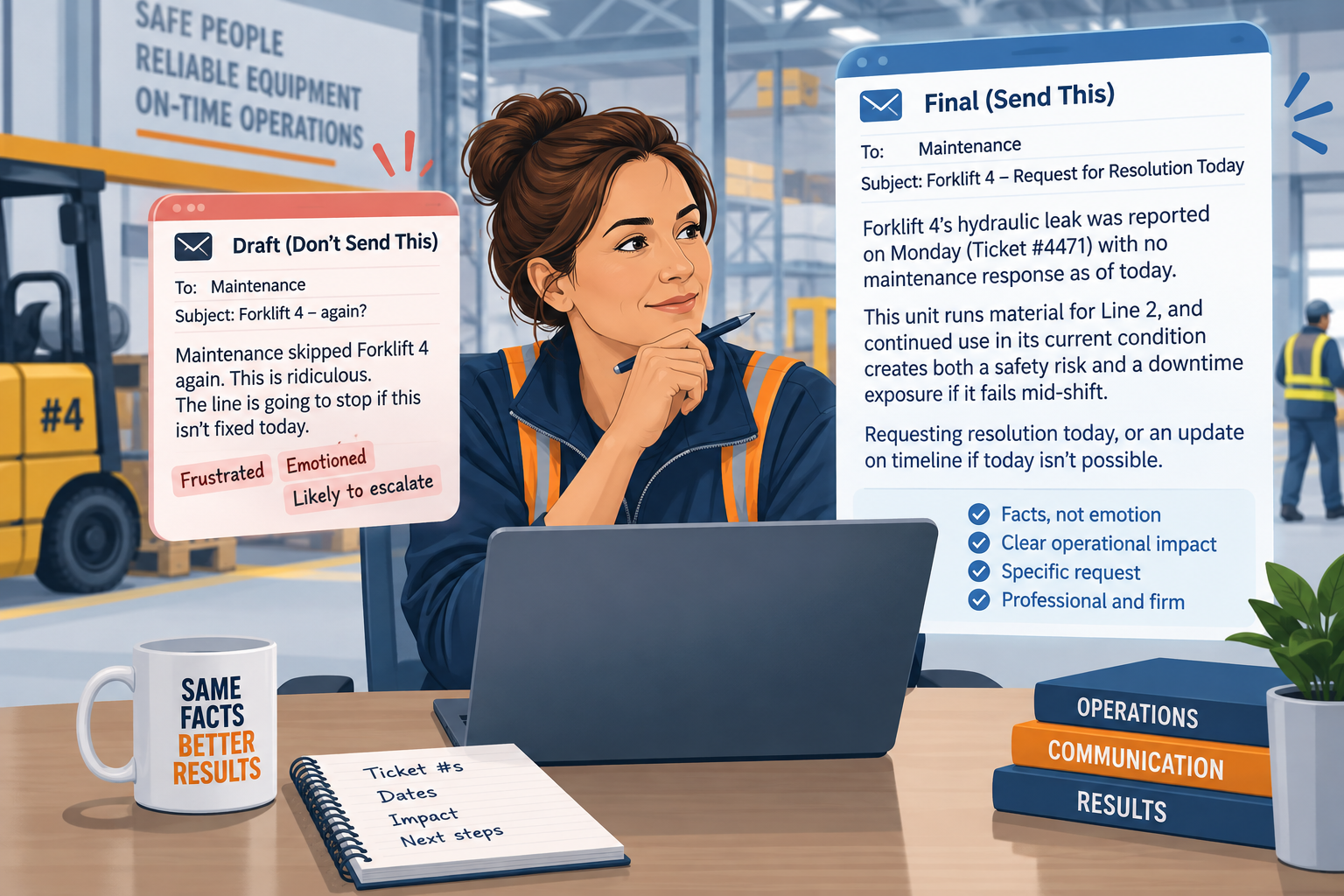
    Card 1: The Raw Frustration Draft

    This is the version that exists in your head before anything gets typed.

    “Maintenance skipped Forklift 4 again. This is ridiculous. The line is going to stop if this isn’t fixed today.”

    Write this version first if it helps. Getting it out of your system matters.

    Just don’t send it. Don’t skip straight past it either, because the frustration in it is where the real information is buried.

    Card 2: The Calibrated AI Prompt

    Feed the raw version to Claude or ChatGPT with instructions like this:

    “Rewrite this with a firm, objective operational tone. Cite the safety risk, the downtime exposure, and the ticket history. Remove the emotion but keep the urgency. Don’t soften it into something that sounds optional.”

    That last line matters. Most rewrite requests accidentally sand a message down until it reads as a gentle suggestion instead of a real problem. This instruction stops that from happening.

    Card 3: The Final Communication

    What comes back reads like this:

    “Forklift 4’s hydraulic leak was reported on Monday (Ticket #4471) with no maintenance response as of today. This unit runs material for Line 2, and continued use in its current condition creates both a safety risk and a downtime exposure if it fails mid-shift. Requesting resolution today, or an update on timeline if today isn’t possible.”

    Same facts. Same urgency. Zero language anyone could screenshot and use against you later.

    Why This Isn’t Just “Being Nicer”

    There’s a real distinction in workplace communication research between assertive and aggressive tone. It’s worth understanding rather than just imitating.

    One breakdown of the difference lays it out cleanly: aggressive communication disregards the other person’s position entirely, while assertive communication states the facts and the need plainly, without either attacking or softening into a suggestion.

    The rewritten forklift email is the assertive version, not a watered-down one. It says exactly what’s wrong and exactly what needs to happen. It just doesn’t hand anyone a reason to focus on your tone instead of the actual problem.

    The Accountability Rule

    Every version of this email works better with two things attached: a timestamp and a ticket number.

    “Maintenance is slow” is an opinion. Opinions are easy to dismiss.

    “Reported Monday, Ticket #4471, no response as of Thursday” is a fact. Facts are a lot harder to wave off in a follow-up meeting.

    Keep a running note of when you reported something and what reference number it got. That habit turns every future email like this into a thirty-second rewrite instead of a fresh fight.

    Why the Rewrite Works Better Than the Original

    The raw version feels satisfying to send. It rarely gets the forklift fixed any faster.

    It tends to make the next request from you a little easier to dismiss too. A heated email is easy to file under “someone’s having a bad day” instead of “real problem, needs action.”

    The calibrated version does something the raw one can’t. It puts the reader in a position where ignoring it looks bad on paper, not just uncomfortable in a conversation.

    That’s the actual goal. Not sounding nicer. Getting the fix.

    A Second Version, Different Department

    Maintenance isn’t the only source of this kind of friction. The night shift leaves a line running out of spec and doesn’t flag it, and the day shift inherits the problem three hours in.

    Raw draft: “Night shift didn’t say anything about Line 3 running hot again. Found out the hard way an hour into my shift.”

    Calibrated: “Line 3 was running above the acceptable temperature range at the start of day shift, with no note in the handoff log. This created a quality risk on the first hour of production before it was caught. Requesting that temperature checks get added to the standard handoff checklist going forward.”

    Same shape, different department. Facts, risk, a specific ask, nothing anyone can dismiss as tone.

    What Not to Let the Rewrite Do

    A calibrated tone isn’t the same as a vague one. If the rewrite starts using phrases like “when convenient” or “at your earliest opportunity,” that’s the tool softening urgency it was told to keep.

    Push back on the draft the same way you’d push back on a person. “Make it more direct” or “add the deadline back in” gets a second pass that fixes it fast.

    A Prompt You Can Reuse on Any Cross-Shift Friction

    The same shape works whether it’s maintenance, another shift, or a different department entirely:

    “Rewrite this with a firm, objective tone. Cite the specific risk or cost of not acting, reference any ticket or timestamp I’ve provided, and keep the urgency without the emotion.”

    Swap in your own raw draft and your own specifics. The structure holds regardless of which department is on the other end.

    When to Stop Emailing and Start Walking Over

    Worth saying plainly: a well-written email is not a substitute for an actual conversation once something’s been ignored twice.

    If Ticket #4471 gets a second silence, the next move is a phone call or a walk to the maintenance shop. Not a third, even better-worded email.

    The template above earns you a fair first shot at resolution through the normal channel. It’s not meant to replace the moment when you decide the normal channel isn’t working anymore.

    The Floor Manager’s $20 AI Stack covers which tool handles this kind of writing best if you’re still deciding. Shift Notes to Shift Handoff: We Tested 3 AIs on the Same Messy Floor Notes picks up the same theme from a different angle, turning a full shift’s worth of chaos into something the next person can use.

    Comment below with the email you really wanted to send this week, and the one you sent instead.

  • Your AI Doesn’t Know Your Operation. Stop Letting It Guess.

    Your AI Doesn’t Know Your Operation. Stop Letting It Guess.

    Every session starts the same way. “I run an evening packaging shift with four lines.” Again.

    Chatbots forget everything the moment a conversation ends. Type your plant layout into a fresh chat one more time and something in you starts looking for a reason to stop using the tool at all.

    There’s a fix. It’s not a better memory feature. It’s a document you write once.

    Memory vs. Something That Stays Put

    A platform’s built-in memory is genuinely useful for tone and general preferences. It’s the wrong place to store anything that has to be exact.

    Memory is a rough impression the tool forms over time. It can drift, misremember a detail, or apply something from a different context by mistake.

    Project Knowledge, or Custom Instructions depending on the platform, works differently. It’s a fixed document you control directly. It says the same thing every time, because you wrote it and nothing’s quietly reshaping it in the background.

    For anything with a real number attached, a safety stock threshold, a maximum changeover time, that difference matters. Memory is a coworker’s recollection. A written document is the actual policy.

    Where This Lives

    In Claude, this goes in a Project’s knowledge base, a file the AI reads before every message in that Project without you retyping any of it. Anthropic’s own help center confirms this is available even on the free plan, up to five Projects, not locked behind a paid tier the way some people assume.

    In ChatGPT, the same idea lives in Custom Instructions or inside a Project’s own instructions field. OpenAI’s own documentation confirms Custom Instructions work across every plan too, web, desktop, and mobile.

    Either way, the mechanism is the same. Write it once, attach it to where you do this specific kind of work. Every future conversation in that space starts already knowing your plant instead of starting from nothing.

    The Shift Binder: What Goes In It

    Three sections, kept short enough that you’ll maintain them.

    Plant Baseline

    ●        Lines you run, and what each one produces.

    ●        Typical throughput per line, per shift.

    ●        Shift hours and crew size.

    Critical Thresholds

    ●        Safety stock limits for anything that runs out and stops a line.

    ●        Maximum acceptable changeover time before it counts as a problem, not routine.

    ●        Any number where crossing the line means something needs immediate attention, not a mention in the next meeting.

    Tone Rules

    ●        Zero fluff. Skip the preamble, lead with the answer.

    ●        Lead with safety and downtime risk before anything else, every time.

    ●        Prioritize by dollar or output impact when more than one thing needs attention at once.

    That’s the whole binder. Long enough to be useful, short enough that updating it doesn’t feel like a chore.

    What a Filled-In Version Looks Like

    Abstract headers are easy to nod along to and hard to write for real. Here’s a real one, short enough to copy the shape directly.

    “Plant Baseline: Four packaging lines, Lines 1 through 4. Line 2 runs the highest volume and is the most changeover-sensitive. Evening shift, 3pm to 11pm, crew of six.

    Critical Thresholds: 6mm fastener backup bin below 150 units counts as low stock. Any changeover over 20 minutes needs a reason code logged. A quality hold on more than 5 units gets flagged immediately, not batched into end-of-shift notes.

    Tone Rules: No preamble, lead with the direct answer. Downtime and safety issues come first in any summary, regardless of what else happened that shift.”

    Three short paragraphs, and every future conversation in that Project already knows the plant.

    A Real Difference This Makes

    Without the binder, “Can you help me figure out if this changeover took too long?” gets a generic answer about changeover best practices. The tool has no idea what your baseline even is.

    With the binder loaded, the same question gets checked against your actual maximum acceptable time, the one you wrote down, not an industry average pulled from nowhere in particular.

    That’s the entire value. Not a smarter answer. The same question, answered against your real numbers instead of a stranger’s guess at what’s normal.

    Where People Get This Wrong the First Time

    The most common mistake is writing the binder like a mission statement instead of a reference document. Nobody needs “we are committed to operational excellence” in there. The tool needs numbers and rules, not values.

    The second mistake is cramming everything into one giant Project. A binder for your evening shift and a binder for a completely different piece of work start fighting each other for relevance. The AI starts blending context that was never supposed to mix. Keep it scoped to one real area of responsibility.

    The third is writing it once and treating it as finished. A binder is closer to a living document than a one-time setup task, even though it feels done the day you write it.

    Keeping It Current

    A binder that’s six months stale is worse than no binder. It’ll confidently apply an old threshold nobody’s used since spring. It’ll sound just as certain doing it wrong as it would doing it right.

    Set a recurring reminder, once a quarter, to open it and check whether anything’s changed. A new line added, a threshold that got revised, a shift pattern that shifted. Five minutes keeps it worth trusting.

    The alternative is finding out the hard way, mid-conversation, that the tool’s still working off a threshold from two supervisors ago.

    Get the Template

    Rather than build this from scratch, The Daily Constraint newsletter has the raw text file ready to import, structured exactly the way it’s laid out above. Subscribe. It lands in your inbox, ready to paste into whichever tool you’re using.

    The Floor Manager’s $20 AI Stack is worth reading first if you haven’t settled on a tool yet. The 5-Whys Incident Framework pairs well with this binder too, since a tool that already knows your plant runs that framework better than one starting cold.

    Comment below with the one detail about your floor you’re tired of retyping every single day.